When you personalize a gift, the product page shows you a live preview that updates as you type. It is easy to treat that preview as a nice extra, a little demo that makes the page feel interactive. It is more than that. The print file is built automatically from the design you chose, which means the preview is the version to check, and there is no separate approval step after you order.
That sounds strict, but it is actually good news. It puts the checking in your hands, at the exact moment when changing a letter costs nothing. This guide gives you a routine for that moment: what to look at, in what order, and how to avoid the small mistakes that people tend to miss when they are excited about a gift.
Why the preview deserves your full attention
Most gift mistakes are not dramatic. Nobody orders a mug with the wrong person’s name on purpose. What happens is quieter: a name typed quickly on a phone, a date written in the order you use at home rather than the order the recipient does, an option left on its default because you scrolled past it. Each of these looks fine at a glance and wrong once the gift is in someone’s hands.
Because the file is generated straight from your choices, the system does not second-guess you. If the preview shows a doubled letter, the print will too. If the date reads one way, it gets made that way. Think of the preview as your proof, and of yourself as the only proofreader in the room.
The good news is that a proper check takes a few minutes, not an afternoon. You do not need to be a designer or a perfectionist. You need a short routine and the willingness to follow it even when you are in a hurry.
A five-minute routine that catches nearly everything
Work through the preview in layers, from the largest question to the smallest. Doing it in one pass, scanning the whole thing at once, is how errors slip through. Doing it in layers forces your eyes to look at one thing at a time.
Layer one: the overall picture
Step back first. Does the design look balanced? Is anything crowded against an edge, or floating strangely in a corner? Imagine the finished object sitting on a kitchen counter or hanging on a hook, and ask whether the arrangement would look deliberate from a few feet away.
Layer two: every name, letter by letter
Now read each name slowly, one letter at a time, ideally with your finger or cursor moving under it. Compare it with a trustworthy source: a message the person sent you, a card they signed, their own social profile. Check capital letters, accents, hyphens and apostrophes. If a name has an unusual spelling, this is where you will catch the autopilot version your fingers typed.
Layer three: every date and number
Dates are the most common place for quiet errors. Read the date aloud and say what it means: “the day we moved in,” “the year she was born.” If the format is ambiguous to someone from another country, think about whether the recipient will read it the way you intend. A year typed one digit off is nearly invisible on a quick glance and painfully obvious later.
Layer four: placement and size
Look at where each element sits and how large it is. A long name on a small item can look cramped, while a short word on a large one can look lost. If something feels tight, try shortening it, for instance a nickname instead of a full name, and watch how the preview responds. That instant feedback is exactly what the live preview is for.
Layer five: the options you picked
Finally, confirm the choices that sit around the design rather than inside it. Depending on the item, that might be a size, a color or a shape. These are easy to forget because they live in menus rather than in the artwork itself, and they are just as permanent once you order.

What to look for on different kinds of gifts
Every object has its own habits. A few minutes spent knowing them in advance will make your check sharper.
Mugs
Quiet Lake at Sunrise with Pines Mug. Pale light spreads over a motionless lake while dark pines line the far shore. The scene is edged by a thin white border, like a keepsake photograph, and the stillness is the whole point: no wind, no crowd, only the first light.
Tumblers
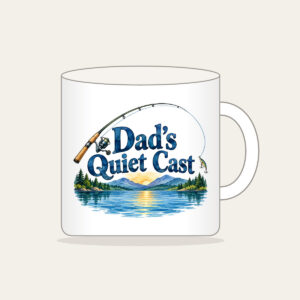
Dad’s Quiet Cast Mug. Dad’s Quiet Cast Mug features watercolor artwork showing a single complete fishing rod and curved line above a calm blue lake motif. The lettering reads “Dad’s Quiet Cast”.
Ornaments
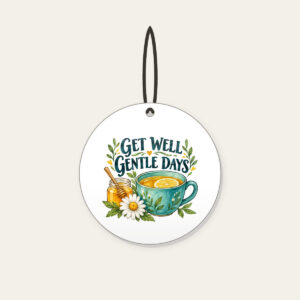
Get Well Gentle Days Ornament is another design to consider for this gift idea.
These gift ideas include made-to-order designs. Choosing finished artwork does not mean an item is in stock or ready for immediate delivery. Some selections use finished artwork; only choose custom text where the listing offers it. Check each product’s options and the shipping information before planning when to give it. The photographs illustrate gift-giving ideas; use each product’s listing to see its own design.
Quiet Lake at Sunrise with Pines Mug
- Free gift
$21.95In stock
Dad's Quiet Cast Mug
- Free gift
$21.95In stock
Get Well Gentle Days Ceramic Ornament
- Free gift
$19.95In stock

Tricks for seeing what your eyes skip
After you have typed something, your brain stops reading it and starts remembering it. That is why typos survive. A few simple habits break the spell:
- Read it aloud. Saying a name or phrase out loud forces you to process each syllable instead of recognizing the shape.
- Read it backwards. For tricky spellings, start at the last letter and move toward the first. It sounds silly and it works.
- Take a short break. Walk away, make tea, come back and look again. Fresh eyes spot what tired ones skip.
- Ask a second person. Show the preview to someone else and ask them to read it back to you without any hints. If they stumble, the recipient might too.
- Check at real size. Zooming in is helpful for details, but also look at the preview at a normal viewing size, because that is how the recipient will see the finished item.

Common mistakes worth a second look
Certain errors come up again and again. If you know them by name, you can hunt for them on purpose.
- Autocorrected names. Phones love to “fix” unusual names into common words. Read the name as typed, not as you meant it.
- Swapped letters. Two letters trading places is the classic typo, and it is invisible when you already know what the word should say.
- Wrong year. Especially around the new year, fingers type the year that just ended. Say the year out loud.
- Nickname versus full name. Decide on purpose which one the recipient would prefer, rather than leaving it to whichever you typed first.
- Forgotten options. A size, color or shape left on its default because the page loaded with it already selected.
If you are curious how names, dates and initials each behave in a design, the page on how to personalize walks through the basics, and our article on choosing between text, dates and initials helps when you cannot decide what to put on the item at all.

If something does not look right
If the preview ever looks off in a way you cannot explain, for example something that will not display properly or an option that does not seem to behave the way you expect, pause before ordering and reach out through the contact page. It is much easier to talk through a question before you order than after.
If you want to know how mistakes are handled once an order exists, the returns page explains the policy in full. Personalized items are made for one specific person, so the safest plan is simply to use the preview as it was meant to be used and check carefully the first time.
Finally, give yourself room. A check done in the last five minutes before a deadline is a rushed check. Order early, leave plenty of time, and treat the preview as the calm, unglamorous step that protects everything that comes after it.
FAQ
Is the preview really what gets printed?
Yes. The print file is built automatically from the design you chose, so the preview is the version to check. There is no separate approval step after you order.
What should I check first?
Start with every name and date, letter by letter, then look at placement and size, and finish with the options you picked, such as color or size.
Does the preview update while I type?
It does. The preview is live, so you can see your changes as you make them and adjust the wording until the design looks right.
What if I have a question about an option?
Ask before you order. The contact page is the place to start, and the FAQ page covers common questions about ordering.